local storage

The localStorage and sessionStorage properties allow to save key/value pairs in a web browser. The localStorage object stores data with no expiration date. The data will not be deleted when the browser is closed, and will be available the next day, week, or year. The localStorage property is read-only.
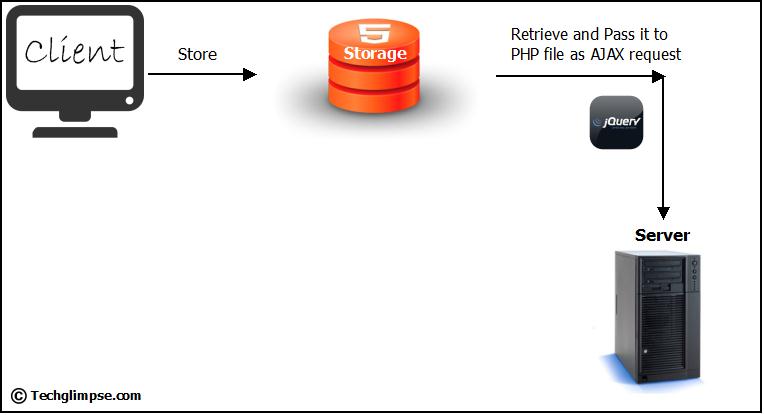
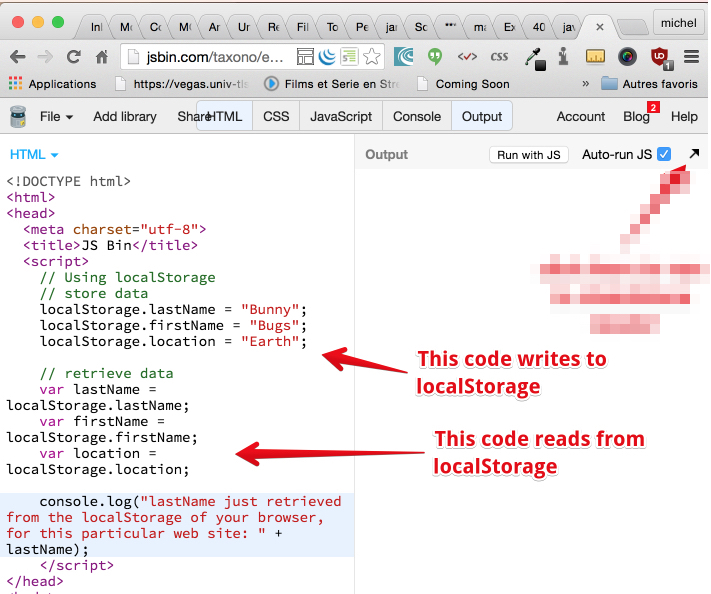
To use localStorage in your web applications, there are five methods to choose from:
- setItem() : Add key and value to localStorage.
- getItem() : This is how you get items from localStorage.
- removeItem() : Remove an item by key from localStorage.
- clear() : Clear all localStorage.
STORAGE HACKS BEFORE HTML5
If neither cookies nor localStorage seem like the right fit, there is another alternative: IndexedDB, an in-browser database system. While localStorage performs all of its methods synchronously, IndexedDB calls them all asynchronously. This allows the accessing of the data without blocking the rest of your code.Save the HTML to localStorage The innerHTML property returns the HTML inside an element as a string, which makes it the perfect way for us to get and store our list. Let’s automatically save a users list every time they add an item to it. You use the localStorage. setItem() method to save data to localStorage .
USING local storage .
ased on named key/value pairs. You store data based on a named key, then you can retrieve that data with the same key. The named key is a string. The data can be any type supported by JavaScript, including strings, Booleans, integers, or floats. However, the data is actually stored as a string .

short quiz .
- what is local storage ?
- what is setItem() ?
- what is removeItem() ?
- what is setItem() ?
for more info please visit my github qusaiqeisi
best regard