HTML text and intrducing CSS
HTML text
html text allaow us to control the text style.
- Headings and paragraphs
- Bold, italic, emphasis
- Structural and semantic markup
Headings and paragraphs
Headings are used to describe the contents below them, it can be a single word or a phrase. In HTML there are six types of headings that are used for various sizes of text.
A paragraph is used if you want to finish what you are talking about and start a new conversation. If you want to explain something on your web you use a paragraph. For a paragraph we use a <p> tag.
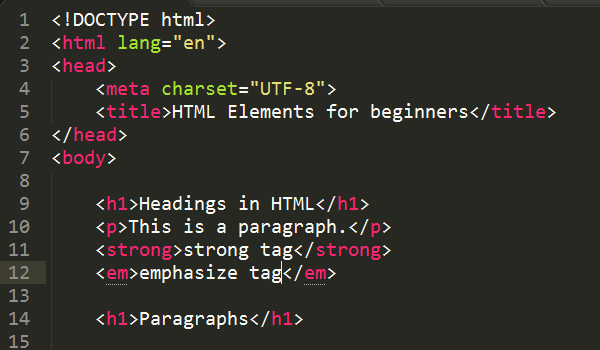
Bold, italic, emphasis
its type of the font style that we can use and its so we can writ
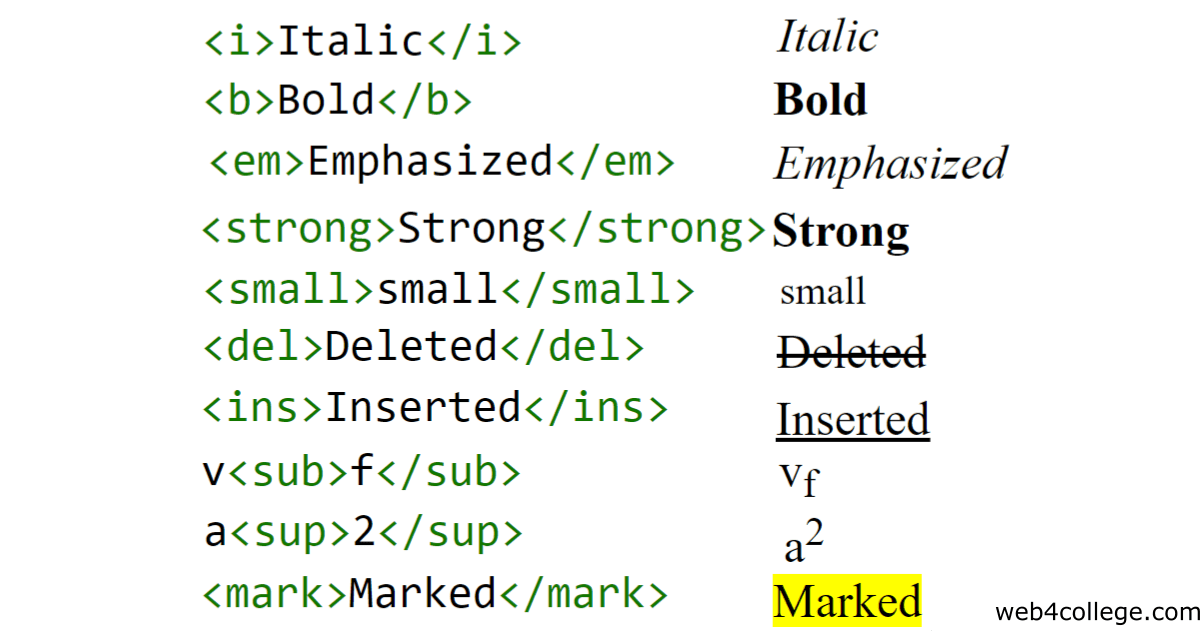
have previously pointed out, that HTML should not be used to affect the look and feel of you web page. Just as you can make words or sentences bold or italic in Word, you can do so using HTML. Up until now, the element, the element, the element, and the have been purely presentational, but with HTML5, a semantic meaning have been added to these four elements.
Superscript & Subscrip
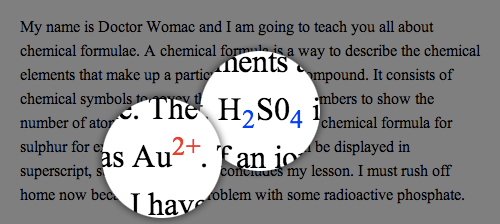
Subscript text appears half a character below the normal line and is sometimes rendered in a smaller font. Subscript text can be used for chemical formulas, like H2O to be written as H2O. Superscript: The tag is used to add a superscript text to the HTML document. The tag defines the superscript text.
Line Breaks & Horizontal Rules
There are two tags that can be used to control the layout of your page.
Horizontal Rule <hr>
Line break
– inserts a end of line where it appear
Neither have a closing tag or associated text.

Abbreviations & Acronyms
If you use an abbreviation or an acronym, then the element can be used. A title attribute on the opening tag is used to specify the full term.

Citations & Definitions
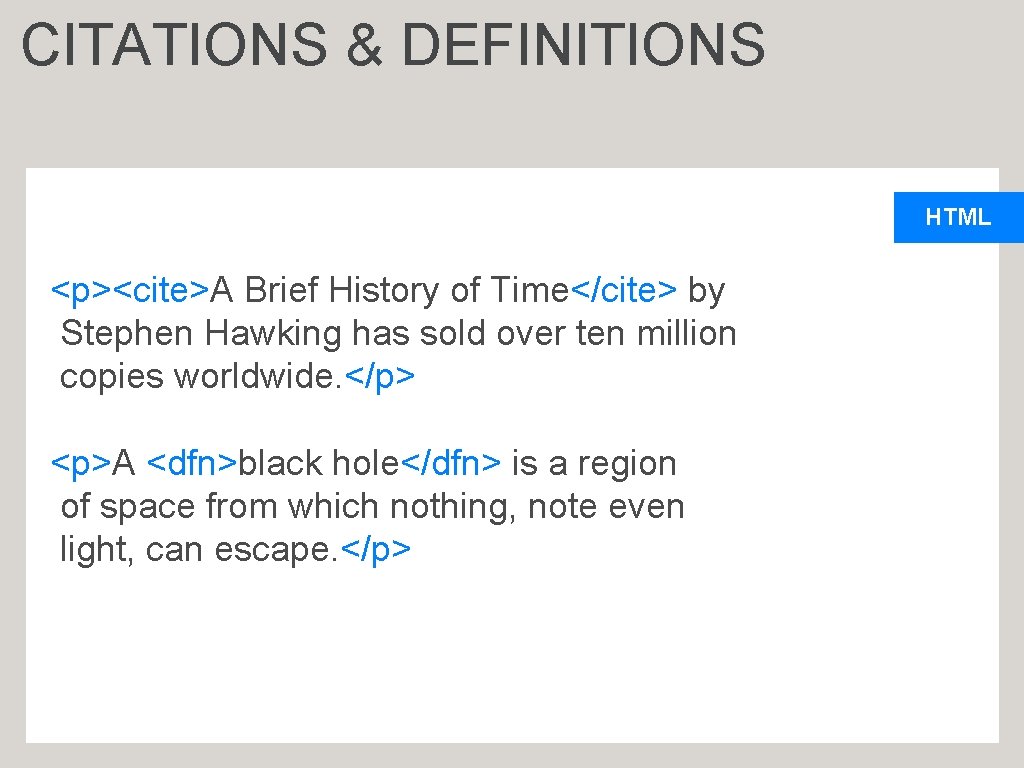
A citation is used to display the text in a format that is different from the normal text. The text embedded within the citation element is normally displayed in an italic form. A citation is normally required to quote the statements or remarks of an author
HTML Definitions The definition element is used to list the definition of various terms. The definition tag is composed of the following three tags DL - Represents a definition list that is used to list the number of definitions DT - Represents the terms in a definition DD - Represents the definitions of the terms
CSS intriduction
- what is CSS ? and how its operat?
- why CSS are important ?
- what is CSS ?
CSS stands for Cascading Style Sheets. CSS describes how HTML elements are to be displayed on screen, paper, or in other media. CSS saves a lot of work. It can control the layout of multiple web pages all at once. External stylesheets are stored in CSS files.

- how its operat?
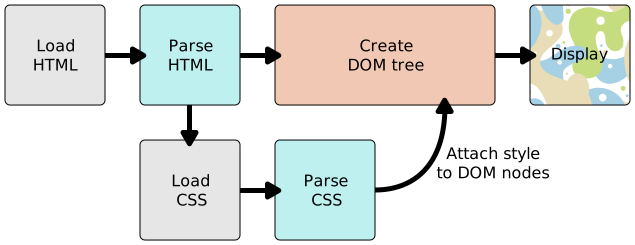
When a browser displays a document, it must combine the document’s content with its style information. It processes the document in a number of stages, which we’ve listed below. Bear in mind that this is a very simplified version of what happens when a browser loads a webpage, and that different browsers will handle the process in different ways. But this is roughly what happens. The browser loads the HTML (e.g. receives it from the network). It converts the HTML into a DOM (Document Object Model). The DOM represents the document in the computer’s memory. The DOM is explained in a bit more detail in the next section. The browser then fetches most of the resources that are linked to by the HTML document, such as embedded images and videos … and linked CSS! JavaScript is handled a bit later on in the process, and we won’t talk about it here to keep things simpler. The browser parses the fetched CSS, and sorts the different rules by their selector types into different “buckets”, e.g. element, class, ID, and so on. Based on the selectors it finds, it works out which rules should be applied to which nodes in the DOM, and attaches style to them as required (this intermediate step is called a render tree). The render tree is laid out in the structure it should appear in after the rules have been applied to it. The visual display of the page is shown on the screen (this stage is called painting).
 .
.

Basic JavaScript
A script is a series of instructions that a computer can follow one-by-one. Each individual instruction or step is known as a statement. Statements should end with a semicolon.
COMMENTS
You should write comments to explain what your code does. They help make your code easier to read and understand. This can help you and others who read your code

VARIABLE?
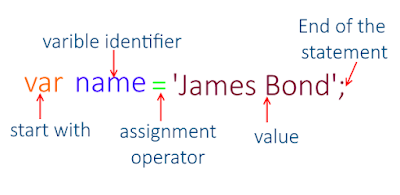
Variable means anything that can vary. JavaScript includes variables which hold the data value and it can be changed anytime. JavaScript uses reserved keyword var to declare a variable. A variable must have a unique name. You can assign a value to a variable using equal to (=) operator when you declare it or before using it.
DATA TYPES
avaScript includes data types similar to other programming languages like Java or C#. Data type indicates characteristics of data. It tells the compiler whether the data value is numeric, alphabetic, date etc., so that it can perform the appropriate operation.
JavaScript includes primitive and non-primitive data types
- Primitive Data Types
- String
- Number
- Boolean
- Null
- Undefined
- Non-primitive Data Type
- Object
- Date
- Array

ARITHMETIC OPERATORS
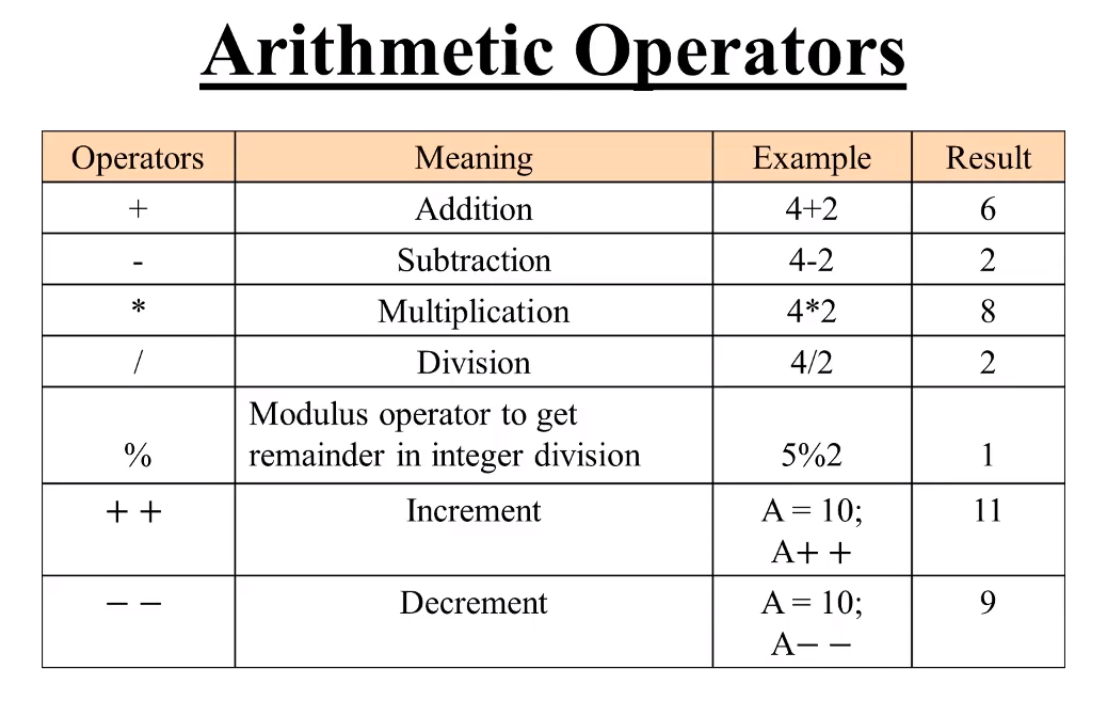
JavaScript contains the following mathematical operators, which you can use with numbers. You may remember some from math class.
Loops and Decisions
- DECISIONS
used to check for a condition whether its true or not .
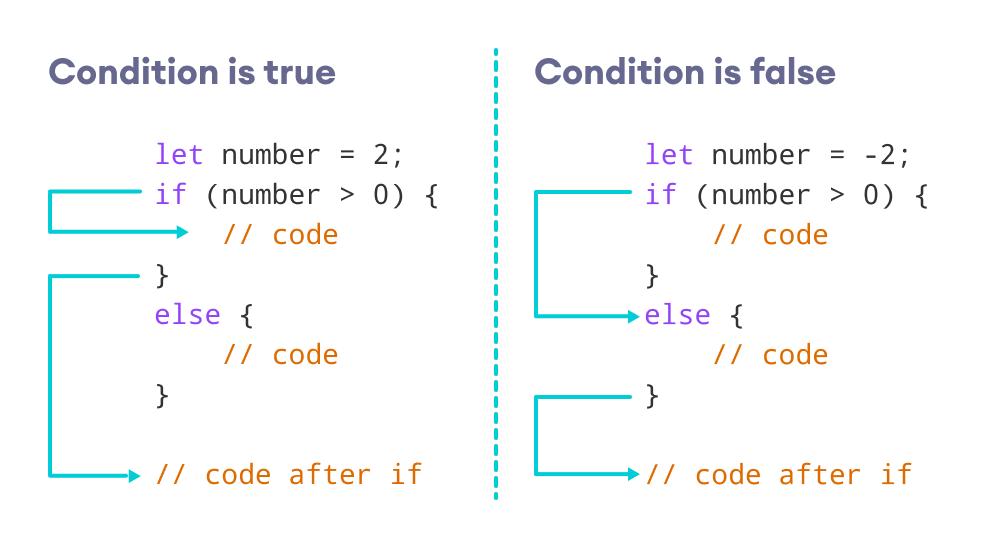
- if statement if is used to check for a condition whether its true or not. Condition could be any expression that returns true or false. When condition satisfies then statements following if statement are executed.
- else statement else statements are used with if statements. When if condition gets fail then else statement is executed.
- else if statement Suppose there are variety of conditions that you want to check. You can use multiple if statements to do this task. All the if conditions will be checked one by one. But what if you want that if one condition satisfies then don’t perform further conditional checks. At this point else if statement is what you need.
loop
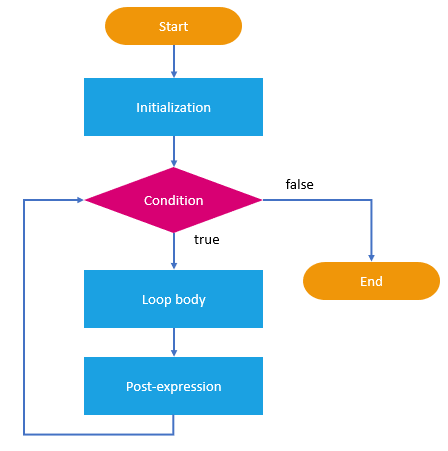
- for loop
for loop repeats until a specified condition evaluates to false. The JavaScript for loop is similar to the Java and C for loop.
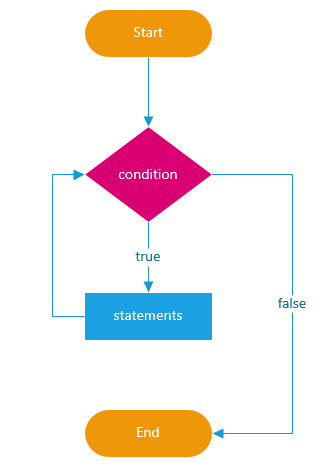
- while loop
he while statement creates a loop that executes a specified statement as long as the test condition evaluates to true. The condition is evaluated before executing the statement.
short quiz
- what is for loop ?
- what is css ?
- what is HTML ?
- how we writ imporatant text …….
for more informatino please click to my profiel qusaiqeisi