Component Based UI
Review, Research, and Discussion
Name 5 Javascript UI Frameworks (other than React)
- Vue
- Angular
- Ember
- Nuxt
- Svelte
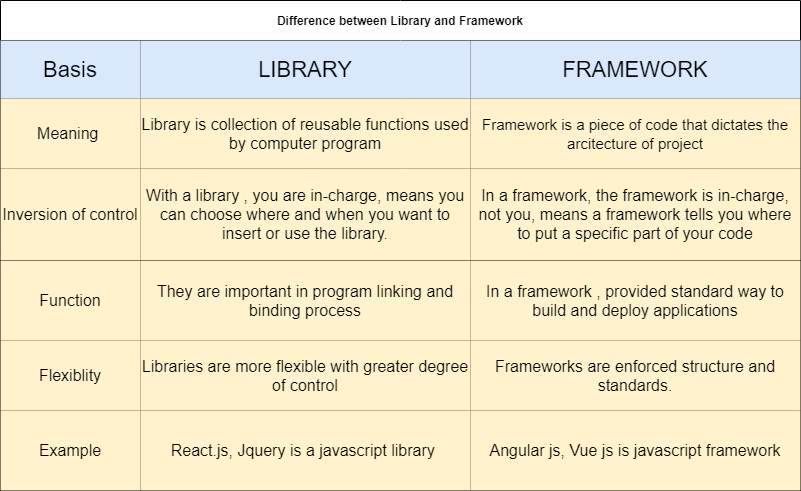
What’s the difference between a framework and a library?
-
Frameworks and libraries are both code written by someone else that helps you perform some common tasks in a less verbose way.
-
A framework inverts the control of the program. It tells the developer what they need. A library doesn’t. The programmer calls the library where and when they need it.
-
The degree of freedom a library or framework gives the developer will dictate how “opinionated” it is.
Document the following Vocabulary Terms
Rendering :
it is a process that is triggered by a change of state in some component of your application.
Templates :
React templates are sets of ready-to-use parts of code built using React technology for the development of dynamic user interfaces.
State :
The state is an instance of React Component Class can be defined as an object of a set of observable properties that control the behavior of the component. In other words, the State of a component is an object that holds some information that may change over the lifetime of the component.
Preparation Materials :
react hello world
- ReactDom library used to render the react components.

introducing JSX
-
JSX : it is a syntax extension in javascript. It allows us to directly write HTML in React (within JavaScript code). It is easy to create a template using JSX in React, but it is not a simple template language instead it comes with the full power of JavaScript.
-
React doesn’t require using JSX, but most people find it helpful as a visual aid when working with UI inside the JavaScript code. It also allows React to show more useful error and warning messages.
-
You can put any valid JavaScript expression inside the curly braces in JSX.
-
React.createElement() performs a few checks to help you write bug-free code but essentially it creates an object.
-
this :
const element = (
  <h1 className="greeting">
    Hello, world!
  </h1>
);
- equal this :
const element = React.createElement(
  'h1',
  {className: 'greeting'},
  'Hello, world!'
);
rendering elements
-
Elements are the smallest building blocks of React apps.
-
An element describes what you want to see on the screen.
<div id="root"></div>
-
this is a “root” DOM node because everything inside it will be managed by React DOM.
-
Applications built with just React usually have a single root DOM node.
External resources:
so the thing is what you abeal to do and achive to undersatnd your coworker team
for more info please visit my github
best regard